Your books, on your counter — and nowhere else.
A complete GST billing, ledger and returns program that runs on one Windows computer with no internet, ever. Tax invoices and bills of supply, e-invoicing, the GSTR-1 file, customer ledgers, purchases and stock — and, uniquely, the whole commission-agent side for a mandi.
For Windows 10 & 11 · No card, no sign-up · Buy once — no subscription
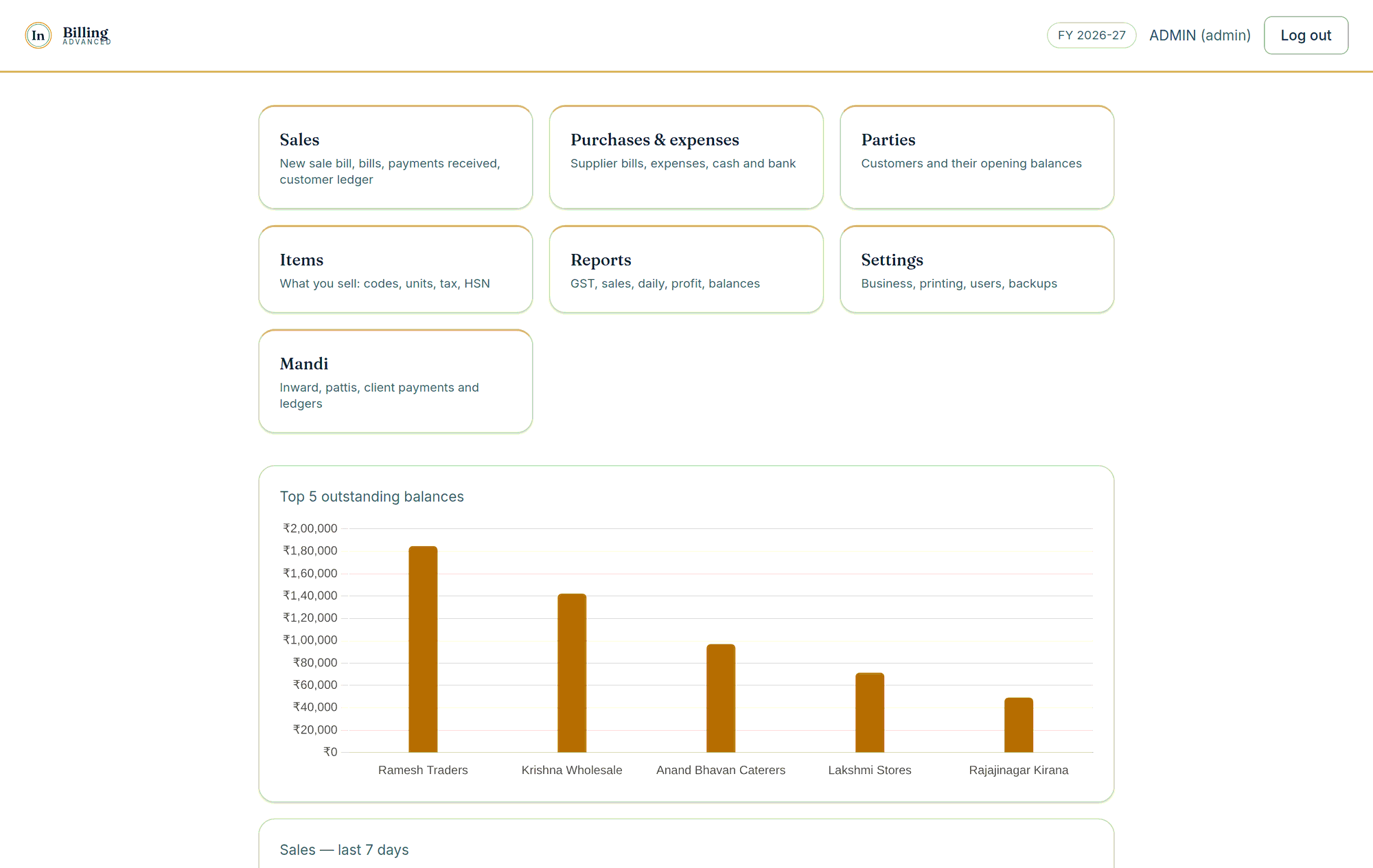
- Works with no internet, ever
- Books encrypted from the first bill
- Tax invoice & bill of supply, done right
- Buy once. No subscription
Three editions. One installer. One price, paid once.
Every edition is a perpetual licence for one computer: no subscription, no renewal, no per-bill charge. Prices are inclusive of GST.
InBilling Basic
A shop or trading business keeping its own books, billing without GST.
One-time licence · Inclusive of GST · 15 days free first
- Sale bills, customers, payments and receipts
- Item master: codes, units, barcodes, prices, stock on hand
- Purchases, expenses, cash and bank, reconciliation
- Customer ledgers by financial year, ageing, statements
- Sales by day, item and category; profit; daily report
- Backups, users and roles, encryption, sealed records
- Printing on A4, A5, A6 or thermal
InBilling Advanced
A commission agent selling growers’ produce on the mandi floor.
One-time licence · Inclusive of GST · 15 days free first
Everything in Basic, and:
- Clients — the growers whose produce you sell
- Inward entry per lorry, and the arrivals register
- Lot-wise selling off the floor, with a lot picker
- Pattis carrying coolie, commission, freight and advance
- Client ledgers, client payments and receipts
- The commission account, and charges and recoveries
- Profit worked out on the commission basis
- Your own three-letter invoice prefix
InBilling Advanced Plus
Any business billing under GST — retail shop, wholesaler, exporter or registered agent.
One-time licence · Inclusive of GST · 15 days free first
Everything in Advanced, and the whole of GST:
- Tax invoice or bill of supply, chosen per bill by the rule itself — Rule 46 or Rule 49
- CGST and SGST, or IGST, decided from the two states
- Reverse charge, marked on the bill and kept out of tax collected
- HSN and SAC per item; prices that include GST; discounts taken before tax
- Credit and debit notes against an issued document
- Supplier bills with input tax, and the purchase register
- The month's GST report, split the way GSTR-3B asks for it
- The GSTR-1 file in the government offline tool's own format
- E-invoice file for the portal; IRN and signed QR read back and printed
- E-way bill file, with the number and validity printed on the bill
- Exports under LUT or with IGST, SEZ, deemed exports, shipping bills, Table 6A
- Balance sheet, and pre-filing checks that name bad bills before your CA does
All three editions are in the one installer. Nothing is downloaded again and no data moves when you step up — you enter a second code, and for Advanced Plus you tick “registered under GST” and put in your GSTIN. The books you already have carry straight over.
Three questions, and you know which edition is yours
Three questions. No form, nothing sent anywhere.
Six things it does that cost other people money
It picks the right document
A bill with any taxable line has to be a Tax Invoice under Rule 46. A bill of only exempt goods — most of a vegetable trade — has to be a Bill of Supply under Rule 49. InBilling reads the lines and prints the correct heading itself. Nobody at the counter has to know the rule.
The books are locked, always
Encryption is not a setting you remember to switch on. The file is encrypted from the first bill, so copying it off the machine or off a backup gets somebody nothing. A recovery key, shown once at setup, is what opens it on a new computer.
Every record carries a seal
Each bill, payment and patti is sealed when it is saved. Verify records checks every one against what it now says, and names anything changed by a database tool or a script rather than by the software. That is what an audit actually needs.
It does not trust the printer
Drivers lie about what paper they can reach. InBilling asks the driver for the size by the driver’s own code, measures the part of the sheet the printer can genuinely print on, and fits the bill inside it. A4, A5, A6 or thermal — and the last digit of the total never falls off the page.
Backups you decide
Choose the folder, choose how often — every day, week, month, or every time you close the program — and how many to keep. A backup that falls due while the machine is off is taken the next time it opens. Restores are version-aware, so an old backup opens on a new build.
Nothing is sent anywhere
There is no account, no server and no telemetry. The program has never needed the internet and does not have a way to use it. Your turnover, your customers and your margins are on your disk and nowhere else.
Bill a customer in about fifteen seconds
Pick the customer, type the item code, let it price the line, press Enter. Rates move daily in this trade, so the rate is editable on every line without touching the item master.
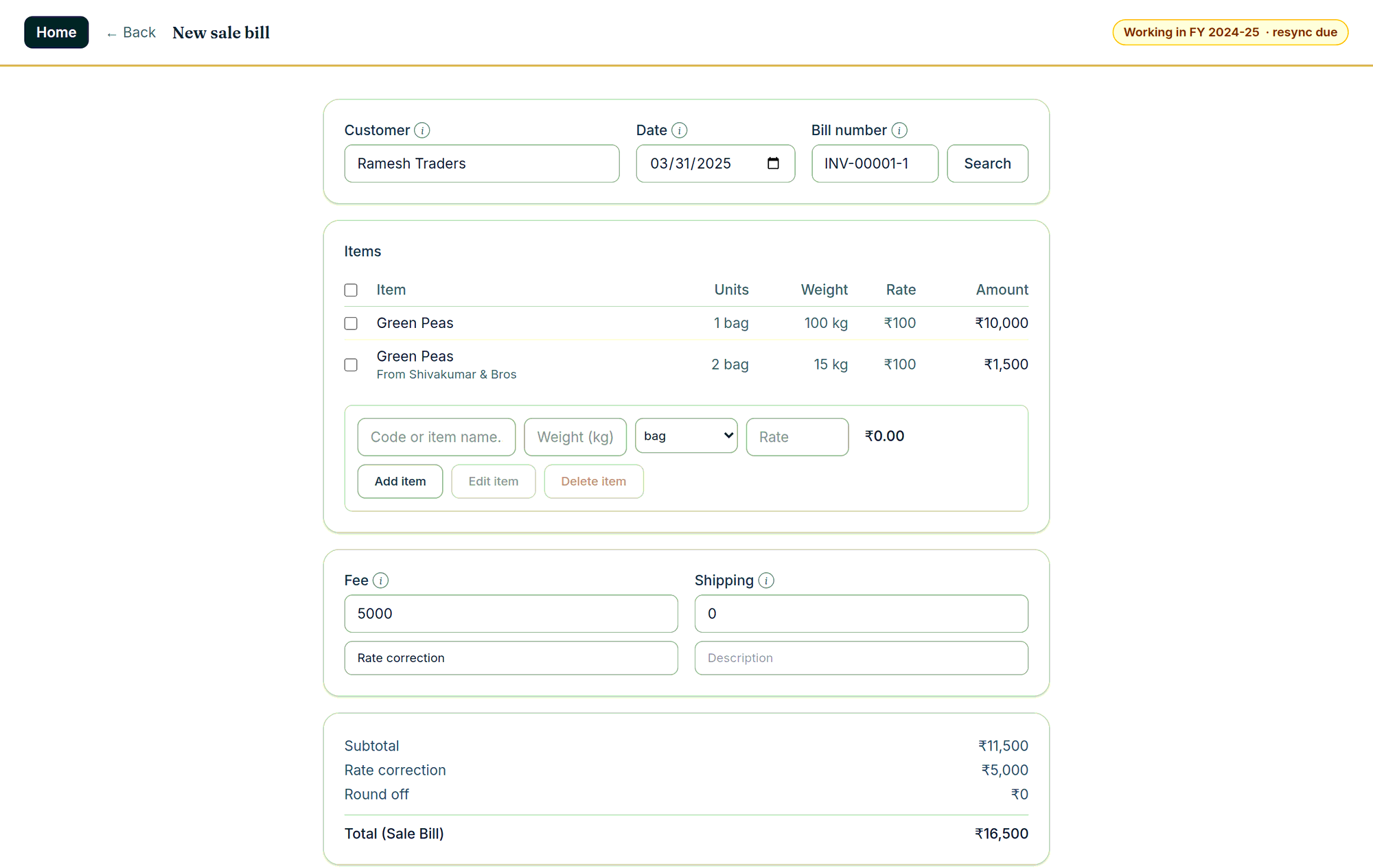
Entry that keeps up with a busy counter
The bill screen is built around the keyboard. Count, weight, rate, Add item — each one Enter away from the next. The item’s price pre-fills the line and both price and quantity stay editable, because the price you actually agreed is the one that has to be on the paper.
- Decimal quantities, and count and weight side by side for a mandi line
- Fees, freight, line and bill discounts, and a visible round-off line
- Previous balance and balance due printed on the bill, so the customer sees the whole position
- Every bill records who created it and who last changed it
Print what the law asks for, at the size you use
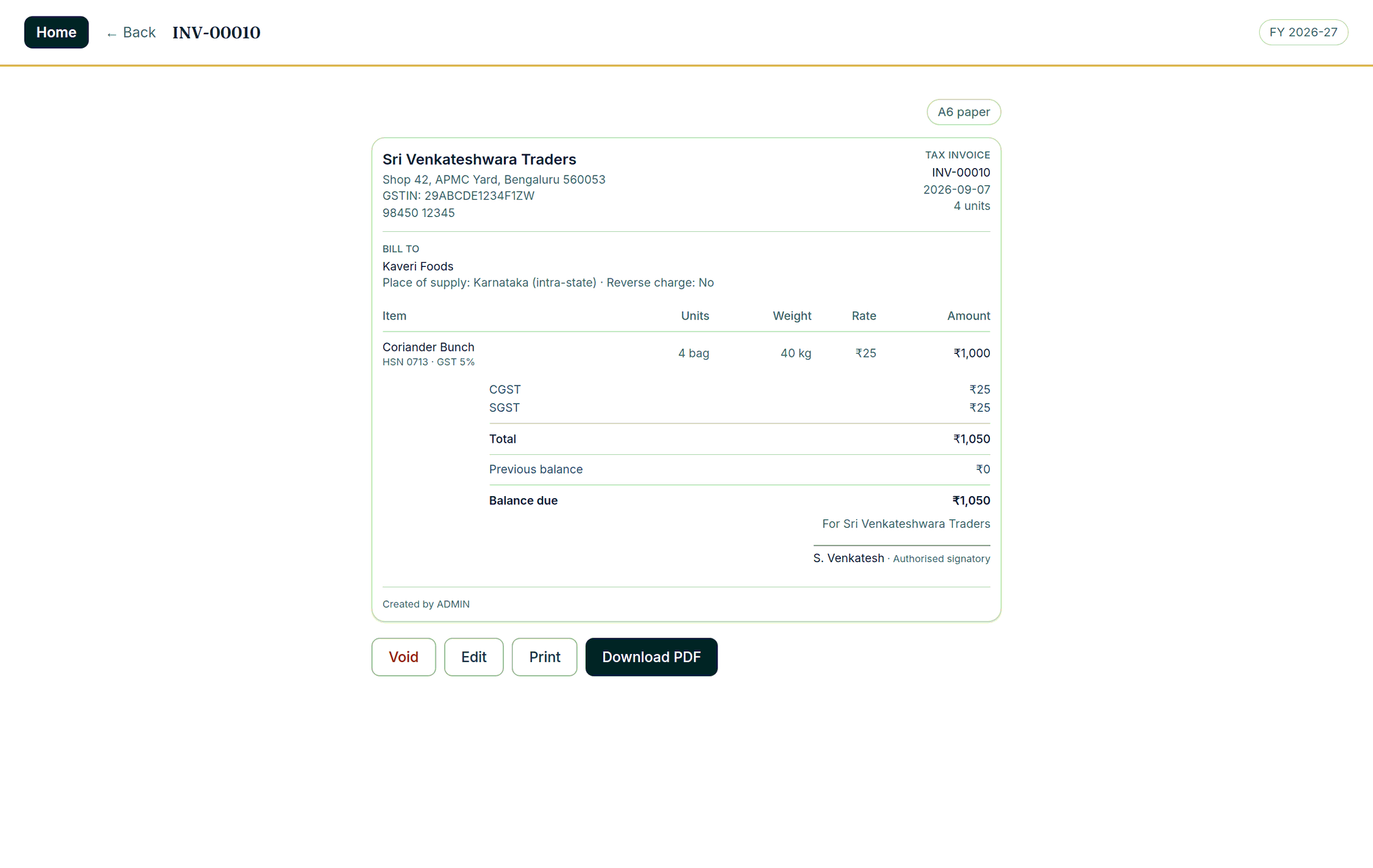
The printed document carries every field the relevant rule requires: your GSTIN, the buyer’s, place of supply, HSN per line, the tax split, the reverse-charge indicator and a signature line. It prints the same on A4, A5, A6 and thermal — on A6 the GSTIN, HSN and tax ride under each line instead of in columns so nothing is lost.
- Tax Invoice or Bill of Supply chosen per bill, automatically
- CGST and SGST, or IGST, decided by comparing the two states
- Print straight to the default printer, or save a PDF, from the same screen
- Bank details, a UPI QR code or a thank-you note in the footer, set once
Ledgers that survive the years
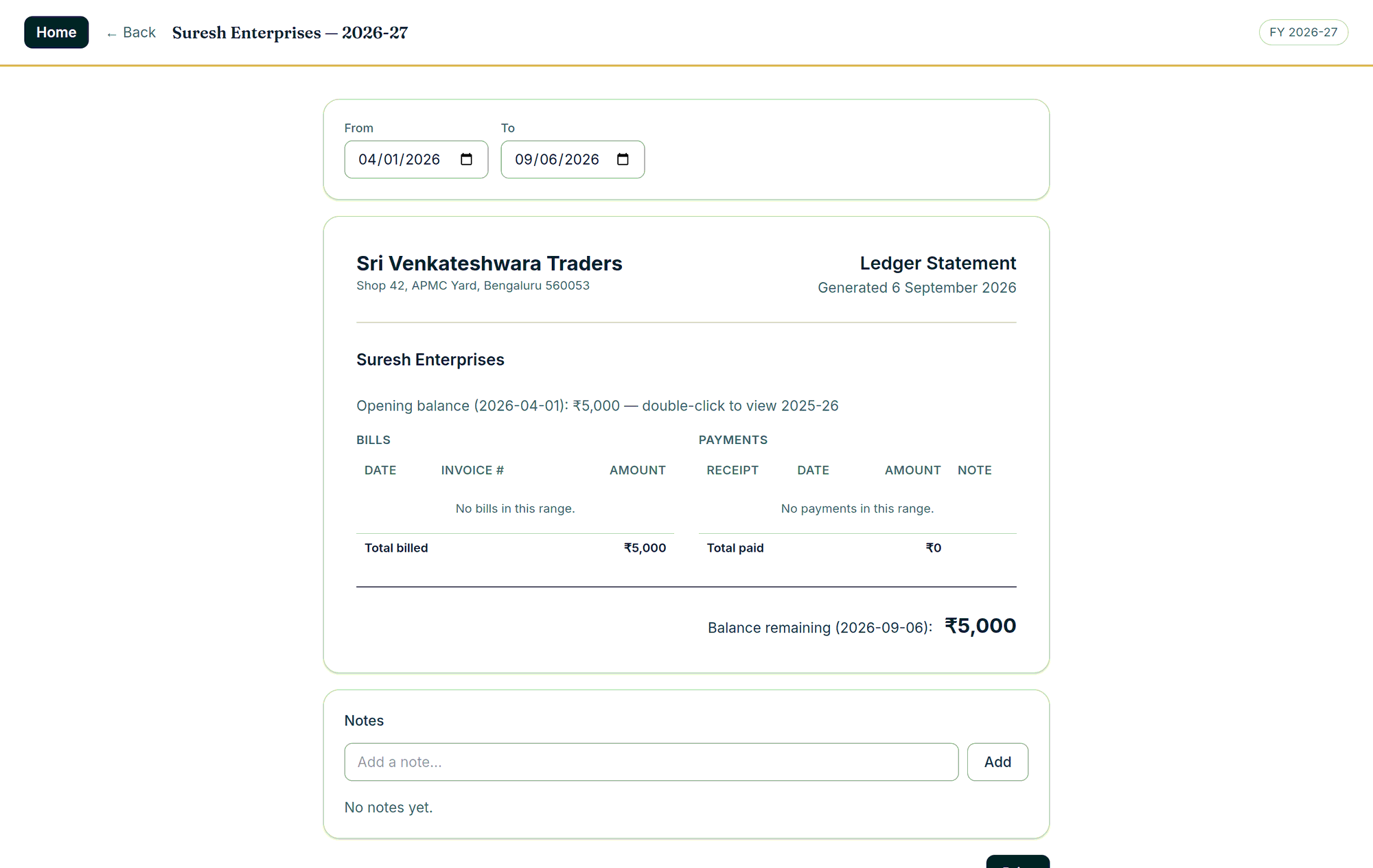
Every customer and every grower has a ledger by financial year: opening balance, bills, payments, running balance, notes, and a statement you can print for any date range. Close a year and the closing balance becomes next year’s opening balance — and if you ever correct a bill inside a closed year, the software walks the correction forward through every later year before it lets you leave.
- Balances can go into credit, and are shown as credit rather than a minus sign
- Ageing: who owes, and has not traded with you for ninety days
- Double-click an opening balance to open the archived year behind it
- Print the whole list ordered by balance, by ageing, or by who is still active
The month your accountant asks for
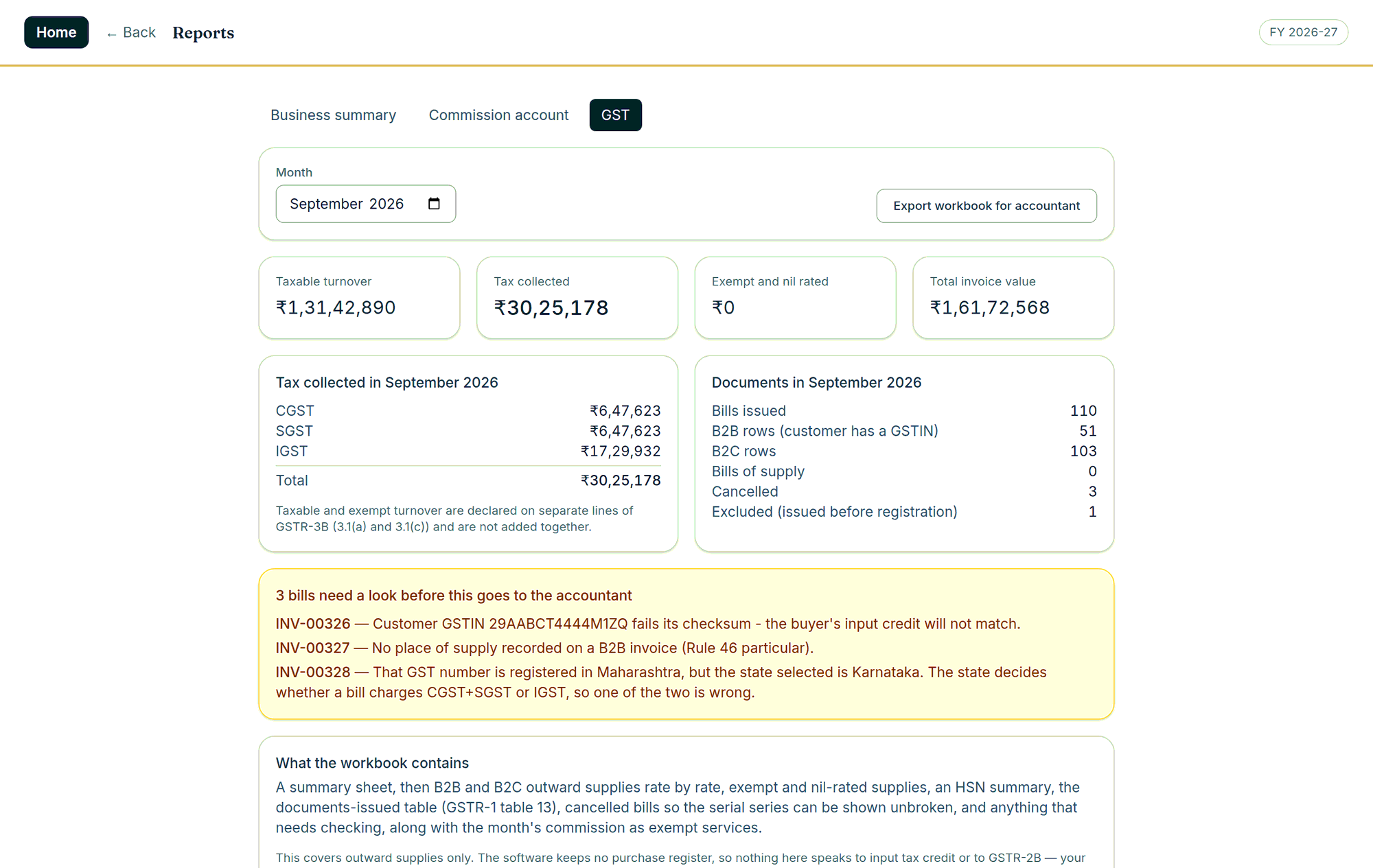
Reports are not an afterthought here. Pick a month and InBilling gives you the taxable turnover, the tax collected split into CGST, SGST and IGST, the document counts GSTR-1 wants, and an export workbook. It also checks the month before you send it, and names the bills that will fail.
- A GSTIN that fails its checksum, or a state that contradicts it, is flagged before filing
- The GSTR-1 file in the government offline tool's own format
- Business summary: sales by day, item and category, payment modes, and outstanding by age
- Profit on either basis, balance sheet, purchase register, stock on hand
It is tested like the record of a business, because that is what it is
This is not a weekend project with a nice screenshot. Every rule that decides a number is covered by tests that run on every change, and the arithmetic is proved twice — once in TypeScript, once in Rust — over hundreds of thousands of generated bills that must agree to the paisa.
automated tests across the program — unit, database, query, migration and end-to-end
generated bills the two implementations of the tax arithmetic must agree on, bit for bit
generated months the GST return, GSTR-1, e-invoice and e-way files are proved over
network calls the program can make. There is no code in it that talks to a server
Figures as at v1.5.7. Restores are tested too: every release’s master backup is restored into a clean clone and compared file by file before it ships.
The things that go wrong in real shops
Not features — consequences. Each of these exists because the alternative costs somebody a year of records or an afternoon with an officer.
Somebody deleted it by mistake
Everything deleted is kept for seven days with who deleted it, when and from which screen. Restore puts it back under its own number.
An issued GST bill has to change
Allowed — warned, reasoned, the word typed out and the administrator’s password given, and written to a changes log that cannot be quietly edited.
A new hand is learning
Give them a test account. It bills and prints exactly like the real thing, everything it prints is watermarked TEST, and when it signs out every trace of it is gone.
The counter is left unattended
The screen locks itself after five minutes, or the moment you press Ctrl+L. Type your password and the half-finished bill is exactly where you left it.
Windows was reinstalled
Keep the books on a second drive and the program finds them again by itself. If the folder is ever missing it stops and says so — it will never quietly start an empty book.
The computer was stolen
The file is encrypted, so it is unreadable without the key. Your recovery key, kept at home, opens your books on a new machine.
Built for the GST counter — and for the mandi floor
Everything a GST-registered shop, wholesaler or exporter has to produce, InBilling produces — correctly, and checked before it reaches your accountant. And because it began on a mandi floor, it also knows what a patti is, which almost nothing else does. You are shown only the half you actually work in.
You bill under GST
Retail counter, wholesale trade or export — and the returns that follow.
- Tax invoices and bills of supply, with the right heading chosen for you
- Barcodes at the counter, prices that include GST, line and bill discounts
- Supplier bills with input tax, expenses, cash and bank, reconciliation
- Stock on hand, profit, balance sheet, sales by day, item and category
- The GSTR-1 file, the e-invoice file and its IRN and QR, the e-way file
You sell other people's produce
Growers, inward loads, pattis, coolie, commission — the work nobody else builds software for.
- Inward entry per lorry: vehicle, bags, weight, freight — and an arrivals register
- Sell off the floor, lot by lot, with a picker when two growers hold the same commodity
- Pattis that carry coolie, commission, freight and advance, and print as a bill of supply
- Client ledgers by financial year, client payments, receipts, the commission account
- Profit worked out on the commission basis, not on goods you never owned
What changed in the newest version
Every release is listed on the What’s new page with its notes and its installer. The newest one is here.
InBilling 1.6.0 · 12 September 2026 · 211 MB · Windows 10 & 11, 64-bit
- Bills open as a print preview — the sheet exactly as it will print, on a grey desk, with print and save-as-PDF at the top and a zoom (fit page, 50–150%) that the machine remembers.
- Ledger statements page by page — a customer’s or client’s ledger is the printed statement cut into A4 pages, Page 1 of 3 with previous and next, and Print and Download PDF put out every page.
- Year end, resync and verify are each one step — a power cut in the middle leaves the books exactly as they were.
- Every figure the program works out — a payment, a bill, a ledger, the year end — now comes from one shared rule set, the same one the coming phone app uses. Nothing changes in what is calculated; every figure was proved the same before the switch.
- Sign-in slows down after wrong passwords: five wrong and a fifteen-minute wait, growing each time, with a warning before each.
- inbilling.in in small type at the foot of bills and statements on the trial and for thirty days after activation; after that, Settings › Licence has a box to turn it off.
- Smaller: Add item is the dark button on the bill, the inward entry and the client bill; Edit and Delete on a line are proper buttons; the inward entry asks before it saves.
Download InBilling 1.6.0 · Windows, 211 MB 2 downloads
Questions people ask
Yes. InBilling runs entirely on one Windows computer. There is no login to a server, no cloud account and no sync. The installer even carries Microsoft’s WebView2 runtime inside it, so it installs on a machine that has never been online in its life. Your books never leave the shop.
Nothing is deleted and nothing is locked away. Everything you entered stays readable, printable and exportable — you simply cannot enter anything new until a licence code is put in. Open Settings › Licence, send us the code on that screen, and we send one back.
No. The licence is perpetual: you buy it once and it keeps working. It is tied to the computer it was activated on, so if you change machines you ask us for a fresh code — which costs nothing.
Yes, and the software rearranges itself for you. Turn GST billing off and the tax screens, returns and portal files disappear entirely; you get the plain map — data entry, printing, purchases and expenses, items, settings — and bills without a tax column.
Not on two computers — this is a single-machine program by design. But two people can share one counter with a login each, and every bill and payment records who wrote it and who last changed it.
In small type, on the trial and for thirty days after a licence is activated. After that, Settings › Licence has a box to turn it off. Everything else on the bill is your business and nobody else’s.
The trial takes backups exactly as the licensed program does, and keeps them. Restoring is part of the licensed software — the backups you took on the trial restore the moment the book is licensed.
That is what the backup and the recovery key are for. InBilling takes scheduled backups to a folder you choose — a pen drive or a second disk — and the books are encrypted, so the recovery key you were given at setup is what opens them again on a new machine. Keep it at home, not beside the computer.
Try it on your own counter for 15 days.
Install it, enter a real day’s bills, print one on your own printer. Nothing is sent anywhere, and nothing expires until the fifteenth day.